 Ledgr
- Guides
- Money
Debt payoff & pay later
Ledgr tracks credit cards and loans as bills with a balance, an interest rate and a standing. It shows when each one clears, compares paying them off by avalanche or snowball, and follows buy-now-pay-later plans payment by payment.
You don't need anything special to start. A card or loan is a bill like any other, with a few extra details. Add the balance you owe and Ledgr can work out the rest: a payoff date on the bill, the Debt Payoff Planner on the Money tab, and reminders that mention a late fee if you fall behind.
The planner and payoff dates are estimates from the figures you enter. They're there to help you see your options, not financial advice. See the financial disclaimer.
Cards and loans as bills
- Tap + and choose New Bill.
- Tap a template such as Credit Card, Student Loan, Car Loan, Personal Loan or Collections, or type your own name.
- Enter the amount you pay each time, not the balance. For a card, that's usually the minimum or what you plan to pay.
- Set the due date and how it repeats, usually Monthly.
- If you track the card or loan as an account, choose it under Card or Loan Account.
- Tap All Details to fill in the debt details below, or tap Add and fill them in later from Edit.
For a debt category, the form puts a Debt section straight after the essentials. For any other bill, the same fields are under More Options. See Adding bills for everything else a bill can track.
The debt details
- Card or Loan Account: the account this bill pays down, if you track it in Money (see below).
- Balance Owed: what you owe in total. If the bill is linked to an account, this follows the account's balance and you change it there.
- Minimum Payment: the least you must pay each time. If your payment is below it, the form warns that the account would fall behind.
- APR %: the yearly interest rate, such as 24.99. An APR over 100% gets a note to check the decimal point.
- Standing: Current, 30 Days Past Due, 60 Days Past Due, 90+ Days Past Due, In Collections or Charged Off. If the due date you've entered is more than 30 days ago, Ledgr suggests a standing with a Set to… button.
- Missed Payments: a count, shown for 90+ Days Past Due, In Collections and Charged Off.
- Past Due Amount: shown once the standing isn't Current. Enter what it takes to get current, as your statement shows it. Left empty, Ledgr estimates it as a payment and a late fee for each one missed, but your statement's figure is better.
- Late Fee: what the lender charges if you pay late.
Tip: If you're behind, setting the Standing and Past Due Amount gives you a "To Get Current" figure on the bill, so you know exactly what to pay to catch up.
Following a debt on its bill
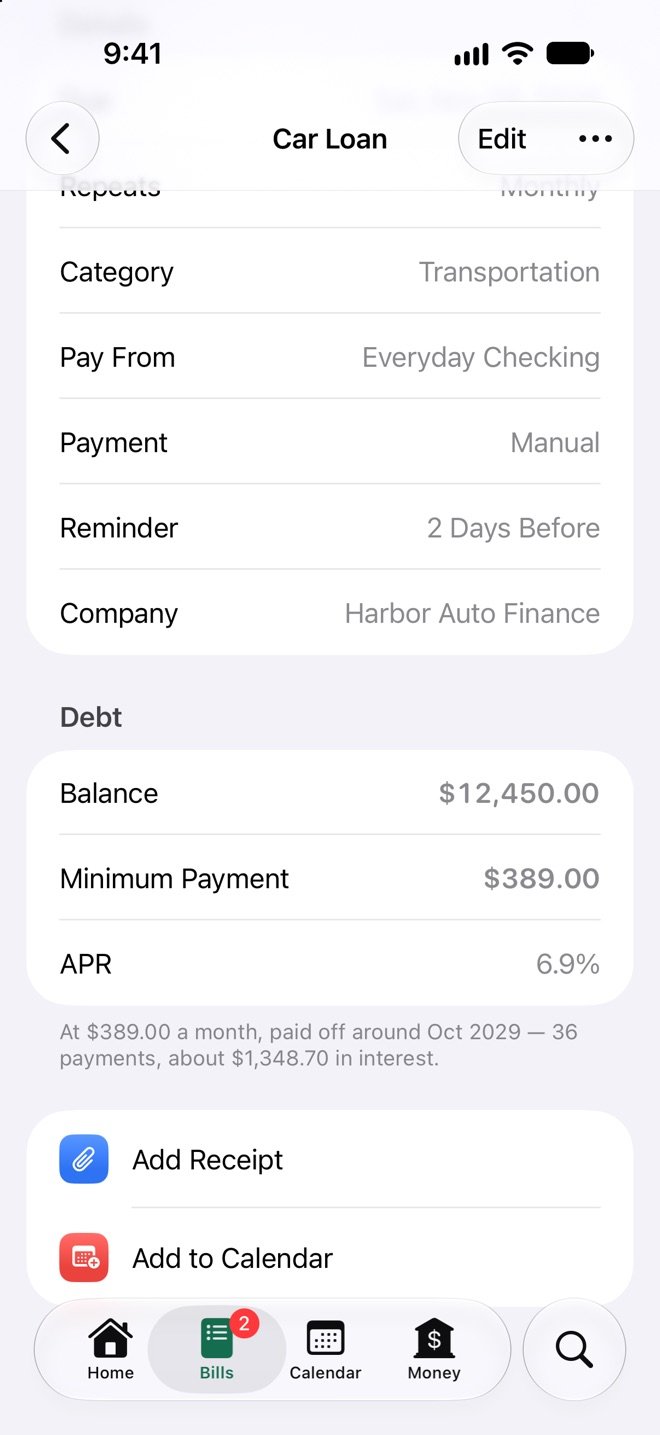
Open the bill to see its Debt section: Balance, Minimum Payment, APR, and, if you're behind, Standing, Past Due (or Past Due (Estimated)), To Get Current and Late Fee.
For a monthly bill with a balance, a line underneath says when it clears at the bill's amount:
- "At $X a month, paid off around [date] — N payments, about $Y in interest."
- "Paid off with the next payment." when the balance is no more than one payment.
- If the payment doesn't cover the interest, it says the interest keeps the balance from going down.
Paying it down
Each time you mark the bill paid or log a payment, the payment comes off the Balance Owed. When the balance reaches zero you'll see "Paid Off!", and the standing goes back to Current.
Reminders and alerts
- Overdue reminders mention the late fee and the account's standing when you've entered them. See the reminders guide.
- With Money Alerts on in Settings › Reminders, Ledgr can tell you about interest building up and past-due accounts.
Linking a card or loan account
If you track a credit card or loan as an account on the Money tab, link it to its bill with Card or Loan Account. Then:
- Paying the bill moves the money from the bill's Pay From account to the card or loan, lowering what it owes.
- The payment isn't counted as spending, because the purchases on the card already were.
- The bill's Balance Owed follows the account's balance.
- The account is left out of Safe to Spend, so the debt isn't taken off twice.
To add the account, see Accounts. Choose the Credit type for a card, or turn on This Is Money Owed for a loan.
The Debt Payoff Planner
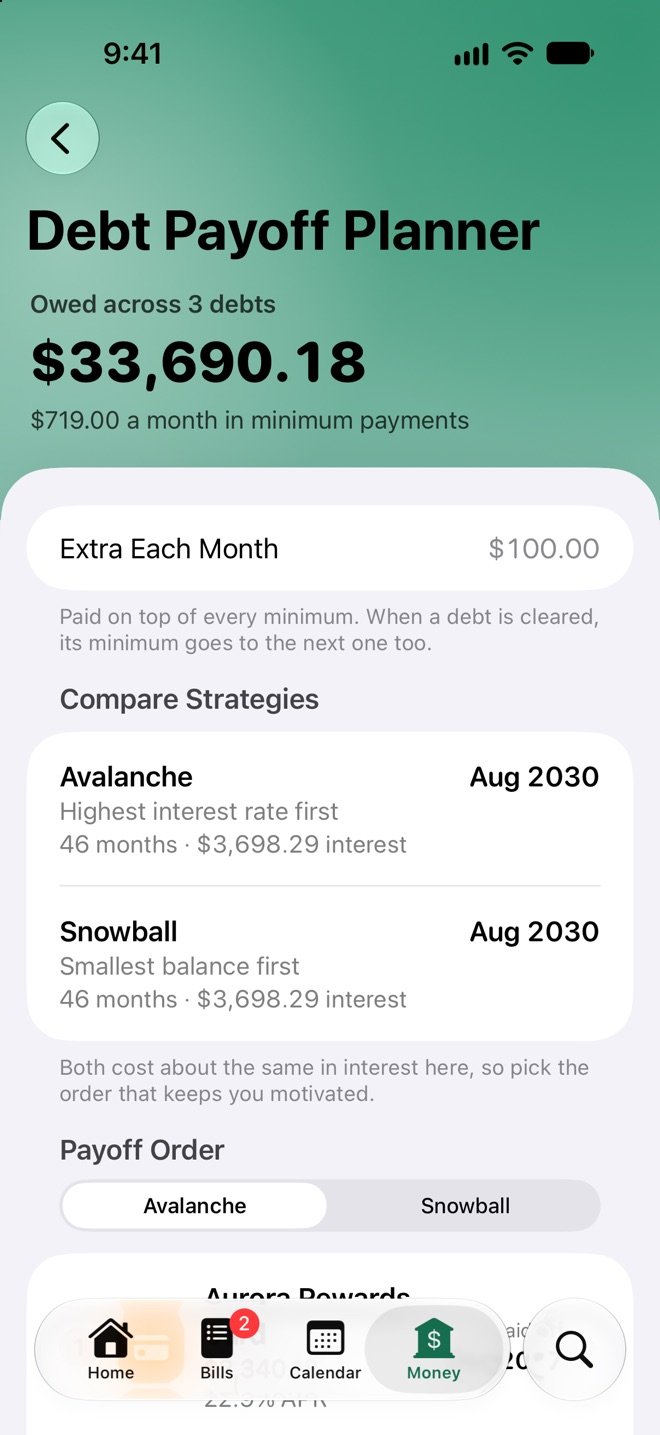
The planner appears once at least one bill has a Balance Owed. It looks at all your debts together and shows when they'll be cleared and what they'll cost in interest.
- On the Money tab, switch to Plan.
- Under Tools, tap Debt Payoff Planner.
- Enter what you can pay on top of your minimums in Extra Each Month.
- Compare the two strategies, then choose one under Payoff Order to see the order and dates.
The top shows the total owed across your debts and what the minimums come to each month.
Compare Strategies
- Avalanche ("Highest interest rate first"): usually costs the least in interest overall.
- Snowball ("Smallest balance first"): clears your smallest debt soonest, which can help you keep going.
Each shows the month you'd be debt-free, how many months that is and the total interest. The cheaper one is marked Best, and a line below says how much it saves. If both cost about the same, it says so. If the payments can't keep up with the interest, it says the debts never clear, or take over 50 years, and suggests a larger extra amount.
Payoff Order
Switch between Avalanche and Snowball to see the debts in the order that strategy pays them, each with its APR and the date it's paid off. Tap a debt to open its bill.
How it's worked out
Each month, every debt gets a month of interest (its APR divided by 12) and its minimum payment. A bill with no Minimum Payment uses its amount. The extra goes to the first debt in the strategy's order. When a debt is cleared, its minimum rolls over to the next one too, so both strategies speed up over time.

Tip: The planner counts every bill with a balance, including ones with no account behind them. Money's Debts total only counts card and loan accounts, so the two can differ. The planner says which bills make the difference.
Pay Later Plans
A pay later plan splits a purchase into payments, like Affirm, Klarna or Afterpay. Ledgr turns it into a bill that tracks each payment and how many are left.
- Tap + › New Bill and tap Pay Later Plan, or on the Money tab's Plan segment tap + › New Pay Later Plan.
- Enter the Purchase Amount and the store or item, for example "Sneakers".
- Choose the Provider: Affirm, Afterpay, Klarna, PayPal, Sezzle, Zip, or Other (then type its name).
- Choose the Plan (see below) and when the first payment, or the single payment, is due.
- If you've already made some payments, set Payments Made.
- Optionally choose Pay From, and turn on Autopay and Remind Me.
- Tap Add.
Plan types
- Pay in 4: four interest-free payments, two weeks apart. The first is usually paid at checkout.
- Monthly: a number of monthly payments, with an APR %. Leave it at 0 for an interest-free plan. With an APR, Ledgr shows roughly what the interest adds and the total cost. Check your provider for the exact amounts.
- Pay in Full Later: the whole amount, paid once on the due date.
The form lists each payment before you save, with how many are left and what they add up to. With a Pay From account, each payment is deducted from it when it's marked paid.
Following a plan
- The bill is named after the purchase and provider, such as "Sneakers (Afterpay)", and shows which payment is due, like "2 of 4".
- Its screen has a Pay Later Plan section with the provider, the purchase, what's left to pay and the final payment date.
- All your plans are listed on the Money tab under Plan › Pay Later Plans, with how many payments are paid.
- Mark each payment paid as you would any bill. See Paying, snoozing & skipping.
Common questions
Should the bill amount be my balance or my payment?
Your payment. The balance goes in Balance Owed. Ledgr uses the two together to work out the payoff date.
Why don't I see the Debt Payoff Planner?
It appears once a bill has a Balance Owed. Add a balance to a card or loan bill and it shows up under Plan › Tools.
Which strategy should I choose?
Ledgr shows the dates and interest for both so you can compare. Avalanche usually costs less, and Snowball gives you quicker wins. The choice is yours. For advice on your situation, speak to a qualified adviser.
Does Ledgr pay my card or loan?
No. Ledgr doesn't move money. Marking a bill paid records the payment you made yourself.
Still stuck?
Try Troubleshooting, send a message from Settings › Contact Support in Ledgr, or email hello@szymonstephansikora.com. I read every message.